
Visual RAG
Visual RAG indiziert Ihre Dateien sowohl als Text als auch als Bild und kombiniert die Stabilität der Textindizierung mit der Flexibilität der visuellen Indizierung. Es kann Informationen aus Grafiken, Diagrammen und komplexen Tabellenlayouts abrufen, die textbasierte RAG-Systeme übersehen.
Was Sie lernen werden:
- Wie Sie Dateien hochladen und Vektorspeicher erstellen
- Wie Sie mit Text- und Bildabruf suchen
- Wie Sie eine End-to-End-RAG-Pipeline aufbauen
Unterstützte Formate: PDF, PPTX, DOCX, HTML, PNG
Arbeitsablauf
Abschnitt betitelt „Arbeitsablauf“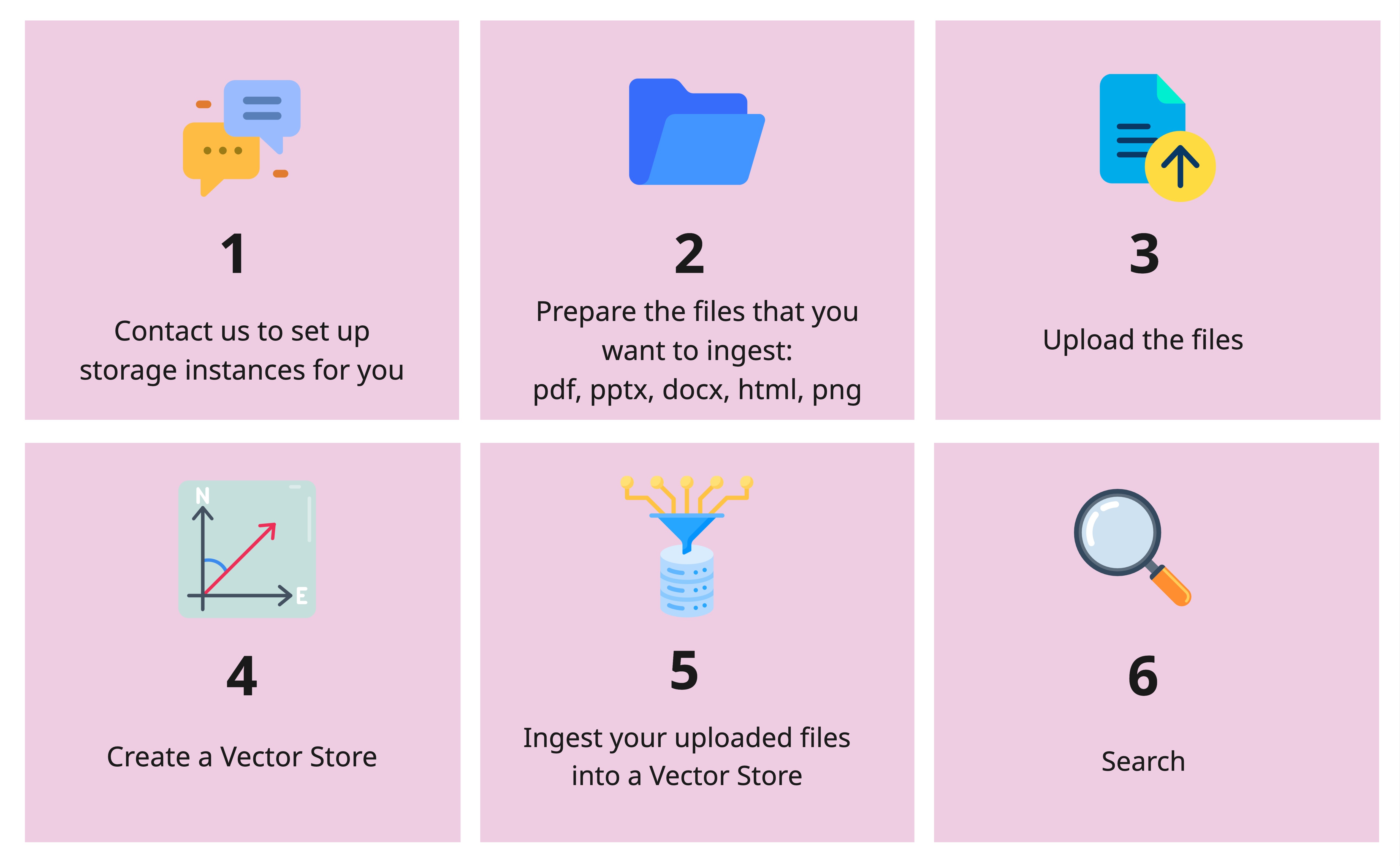
Einrichtung
Abschnitt betitelt „Einrichtung“import os
from openai import OpenAI
client = OpenAI( api_key=os.getenv("OPENAI_API_KEY"), base_url="https://llm-server.llmhub.t-systems.net/v1", # Note: v1 for Visual RAG)Dateioperationen
Abschnitt betitelt „Dateioperationen“Datei hochladen
Abschnitt betitelt „Datei hochladen“uploaded = client.files.create( file=open("/path/to/your_file.pdf", "rb"), purpose="visual-rag",)print(f"File ID: {uploaded.id}")Dateien auflisten
Abschnitt betitelt „Dateien auflisten“file_list = client.files.list(purpose="visual-rag")for f in file_list.data: print(f"ID: {f.id}, Name: {f.filename}")Dateiinformationen abrufen
Abschnitt betitelt „Dateiinformationen abrufen“file_info = client.files.retrieve("file-abc123")print(file_info)Datei löschen
Abschnitt betitelt „Datei löschen“client.files.delete("file-abc123")Vektorspeicher-Operationen
Abschnitt betitelt „Vektorspeicher-Operationen“Vektorspeicher erstellen
Abschnitt betitelt „Vektorspeicher erstellen“vs = client.vector_stores.create( name="my_vs", chunking_strategy={ "text_embedding_model": "text-embedding-bge-m3", "vision_embedding_model": "tsi-embedding-colqwen2-2b-v1", },)print(f"Vector Store ID: {vs.id}")Vektorspeicher auflisten
Abschnitt betitelt „Vektorspeicher auflisten“for vs in client.vector_stores.list(): print(f"{vs.name} ({vs.id}) - {vs.file_counts}")Datei aufnehmen
Abschnitt betitelt „Datei aufnehmen“client.vector_stores.files.create( vector_store_id="xyz-456", file_id="file-abc123", chunking_strategy={ "chunk_size": 1024, "chunk_overlap": 100, },)Aufgenommene Dateien auflisten
Abschnitt betitelt „Aufgenommene Dateien auflisten“files = client.vector_stores.files.list(vector_store_id="xyz-456")for f in files.data: print(f"{f.id} - {f.created_at}")Aufgenommene Datei löschen
Abschnitt betitelt „Aufgenommene Datei löschen“client.vector_stores.files.delete( vector_store_id="xyz-456", file_id="file-abc123",)Vektorspeicher löschen
Abschnitt betitelt „Vektorspeicher löschen“client.vector_stores.delete(vector_store_id="xyz-456")Durchsuchen Sie Ihren Vektorspeicher mit Text- und Bildergebnissen:
results = client.vector_stores.search(    vector_store_id="xyz-456",    query="Which new features are supported?",    extra_body={        "top_k_texts": 3,        "top_k_images": 2,    },)
for result in results:    if result.content[0].type == "text":        print("Text result:", result.content[0].text[:200])    elif result.content[0].type == "base64":        print(f"Image result from {result.filename}, page {result.page_number}")
End-to-End RAG-Beispiel
Abschnitt betitelt „End-to-End RAG-Beispiel“Kombinieren Sie den Abruf mit LLM-Inferenz für eine vollständige Visual RAG-Pipeline:
import os
from openai import OpenAI
rag_client = OpenAI(    api_key=os.getenv("OPENAI_API_KEY"),    base_url="https://llm-server.llmhub.t-systems.net/v1",)llm_client = OpenAI(    api_key=os.getenv("OPENAI_API_KEY"),    base_url="https://llm-server.llmhub.t-systems.net/v2",)
# 1. Retrieve relevant contextcontexts = rag_client.vector_stores.search(    vector_store_id="xyz-456",    query="What are the key metrics?",    extra_body={"top_k_texts": 5, "top_k_images": 3},)
# 2. Build prompt with text and image contextscontent = [{"type": "text", "text": f"Based on the following context, answer: What are the key metrics?\n\n"}]for ctx in contexts:    if ctx.content[0].type == "text":        content[0]["text"] += ctx.content[0].text + "\n\n"    elif ctx.content[0].type == "base64":        content.append({"type": "image_url", "image_url": {"url": ctx.content[0].text}})
# 3. Get answer from LLMresponse = llm_client.chat.completions.create(    model="claude-sonnet-4.6",    messages=[{"role": "user", "content": content}],    max_tokens=2048,)
print(response.choices[0].message.content)
Nächste Schritte
Abschnitt betitelt „Nächste Schritte“- Embeddings — Reine Text-Embeddings für einfacheres RAG
- Multimodal — Bilder mit Vision-Modellen analysieren
- LangChain — RAG mit LangChain verwenden